Hi,
Just a small general notice about GDAL_SKIP: the previous test by using GDAL_SKIP=JP2MrSID should not actually change anything. GDAL takes the first driver that it meets for a format if it is not skipped. If JP2ECW is listed before JP2MrSID with gdalinfo - -formats then it will be used for JP2 and skipping JP2MrSID has no effect. If there are more GDAL drivers available, like JP2ECW, JP2MrSID, and JP2OpenJPEG, it may be necessary to skip several drivers. In this case for using OpenJPEG driver two first ones should be skipped with “GDAL_SKIP=JP2ECW JP2MrSID”. For using JP2MrSID skipping just JP2ECW is enough.
-Jukka Rahkonen-
Lähettäjä: Daniele Romagnoli <daniele.romagnoli@…1107…>
Lähetetty: maanantai 25. maaliskuuta 2019 10.51
Vastaanottaja: Jason Cradit <jasoncradit@…84…>
Kopio: geoserver-users@lists.sourceforge.net
Aihe: Re: [Geoserver-users] GDAL - Failing

···
On Fri, Mar 22, 2019 at 7:50 PM Jason Cradit <jasoncradit@…84…> wrote:
Hey Daniele,
I can confirm if I add the GDAL_SKIP environment variable it removes the ability to add a JP2MrSID store type.
During the build, I see these errors:
22 Mar 18:34:23 WARN [gce.imagemosaic] - Unable to set ordering between tiff readers spi
22 Mar 18:34:23 WARN [gce.imagemosaic] - Unable to set ordering between jp2 readers spi-it.geosolutions.imageio.plugins.jp2ecw.JP2GDALEcwImageReaderSpi:com.sun.media.imageioimpl.plugins.jpeg2000.J2KImageReaderCodecLibSpi
22 Mar 18:34:23 WARN [gce.imagemosaic] - Unable to set ordering between jp2 readers spi-it.geosolutions.imageio.plugins.jp2ecw.JP2GDALEcwImageReaderSpi:com.sun.media.imageioimpl.plugins.jpeg2000.J2KImageReaderSpi
22 Mar 18:34:23 WARN [gce.imagemosaic] - Unable to set ordering between jp2 readers spi-it.geosolutions.imageio.plugins.jp2mrsid.JP2GDALMrSidImageReaderSpi:com.sun.media.imageioimpl.plugins.jpeg2000.J2KImageReaderCodecLibSpi
22 Mar 18:34:23 WARN [gce.imagemosaic] - Unable to set ordering between jp2 readers spi-it.geosolutions.imageio.plugins.jp2mrsid.JP2GDALMrSidImageReaderSpi:com.sun.media.imageioimpl.plugins.jpeg2000.J2KImageReaderSpi
When I try to add the files with verbose logging i see this:
ECW: FileInfo: SizeXY=60000,40000 Bands=3
OriginXY=-1.0926e+07,4.266e+06 CellIncrementXY=0.15,-0.15
ColorSpace=4, eCellType=0
2019-03-22T18:36:32.251919000Z
GDALJP2Metadata: Got projection from GeoJP2 (geotiff) box: PROJCS[“WGS 84 / Pseudo-Mercator”,GEOGCS[“WGS 84”,DATUM[“WGS_1984”,SPHEROID[“WGS 84”,6378137,298.257223563,AUTHORITY[“EPSG”,“7030”]],AUTHORITY[“EPSG”,“6326”]],PRIMEM[“Greenwich”,0],UNIT[“degree”,0.0174532925199433],AUTHORITY[“EPSG”,“4326”]],PROJECTION[“Mercator_1SP”],PARAMETER[“central_meridian”,0],PARAMETER[“scale_factor”,1],PARAMETER[“false_easting”,0],PARAMETER[“false_northing”,0],UNIT[“metre”,1,AUTHORITY[“EPSG”,“9001”]],EXTENSION[“PROJ4”,“+proj=merc +a=6378137 +b=6378137 +lat_ts=0.0 +lon_0=0.0 +x_0=0.0 +y_0=0 +k=1.0 +units=m +nadgrids=@null +wktext +no_defs”],AUTHORITY[“EPSG”,“3857”]]
GDAL: GDALOpen(/efs/common/10926_4266.jp2, this=0x7f10f26d6170) succeeds as JP2ECW.
22 Mar 18:36:32 INFO [geoserver.web] - Getting list of coverages for saved store file:///efs/common/10926_4266.jp2
java.lang.RuntimeException: Could not list layers for this store, an error occurred retrieving them: The Provided input is not supported by this reader
This led me down the path of trying it with the JP2ECW reader and it did work. This is really interesting to me - we aren’t licensed for ECW (which i believe is required, right?) What’s interesting about this is that we are working to upgrade from 2.11 to 2.14 and in 2.11 the same image is loaded as JP2MrSID.
Any thoughts?
Ok. let’s try the opposite, then…
GDAL_SKIP=JP2ECW
So that you explicitly disable the JP2K ECW Driver and we can see the messages from JP2MrSID.
Please, let us know.
Daniele
Thanks,
JasonOn Fri, Mar 22, 2019 at 11:16 AM Daniele Romagnoli <daniele.romagnoli@…1107…> wrote:
Hi Jason,
Let’s try this:
Could you add these additional environment variables?
GDAL_SKIP=JP2MrSID
CPL_DEBUG=ON
You may also want to try increasing the geoserver logging level to verbose in case it reports why the isDecodable method is failing which results into that input not supported message.
Let us know.
Cheers,
Daniele
On Fri, Mar 22, 2019 at 4:59 PM Jason Cradit <jasoncradit@…84…> wrote:
Hey Daniele,
Thanks for the reply!
Yep, I can run the javainfo script, here is the output:
Supported Formats:
VRT (rw+v): Virtual Raster
GTiff (rw+v): GeoTIFF
NITF (rw+v): National Imagery Transmission Format
RPFTOC (rov): Raster Product Format TOC format
ECRGTOC (rov): ECRG TOC format
HFA (rw+v): Erdas Imagine Images (.img)
SAR_CEOS (rov): CEOS SAR Image
CEOS (rov): CEOS Image
JAXAPALSAR (rov): JAXA PALSAR Product Reader (Level 1.1/1.5)
GFF (rov): Ground-based SAR Applications Testbed File Format (.gff)
ELAS (rw+v): ELAS
AIG (rov): Arc/Info Binary Grid
AAIGrid (rwv): Arc/Info ASCII Grid
GRASSASCIIGrid (rov): GRASS ASCII Grid
SDTS (rov): SDTS Raster
DTED (rwv): DTED Elevation Raster
PNG (rwv): Portable Network Graphics
JPEG (rwv): JPEG JFIF
MEM (rw+): In Memory Raster
JDEM (rov): Japanese DEM (.mem)
GIF (rwv): Graphics Interchange Format (.gif)
BIGGIF (rov): Graphics Interchange Format (.gif)
ESAT (ro): Envisat Image Format
BSB (rov): Maptech BSB Nautical Charts
XPM (rwv): X11 PixMap Format
BMP (rw+v): MS Windows Device Independent Bitmap
DIMAP (rov): SPOT DIMAP
AirSAR (ro): AirSAR Polarimetric Image
RS2 (ro): RadarSat 2 XML Product
PCIDSK (rw+v): PCIDSK Database File
PCRaster (rw): PCRaster Raster File
ILWIS (rw+v): ILWIS Raster Map
SGI (rw+): SGI Image File Format 1.0
SRTMHGT (rwv): SRTMHGT File Format
Leveller (rw+): Leveller heightfield
Terragen (rw+): Terragen heightfield
ISIS3 (rov): USGS Astrogeology ISIS cube (Version 3)
ISIS2 (rw+v): USGS Astrogeology ISIS cube (Version 2)
PDS (rov): NASA Planetary Data System
TIL (rov): EarthWatch .TIL
ERS (rw+v): ERMapper .ers Labelled
ECW (rw): ERDAS Compressed Wavelets (SDK 3.x)
JP2ECW (rw+v): ERDAS JPEG2000 (SDK 3.x)
L1B (rov): NOAA Polar Orbiter Level 1b Data Set
FIT (rwv): FIT Image
MrSID (rov): Multi-resolution Seamless Image Database (MrSID)
JP2MrSID (rov): MrSID JPEG2000
RMF (rw+v): Raster Matrix Format
MSGN (ro): EUMETSAT Archive native (.nat)
RST (rw+v): Idrisi Raster A.1
INGR (rw+v): Intergraph Raster
GSAG (rwv): Golden Software ASCII Grid (.grd)
GSBG (rw+v): Golden Software Binary Grid (.grd)
GS7BG (rov): Golden Software 7 Binary Grid (.grd)
COSAR (ro): COSAR Annotated Binary Matrix (TerraSAR-X)
TSX (rov): TerraSAR-X Product
COASP (ro): DRDC COASP SAR Processor Raster
R (rwv): R Object Data Store
PNM (rw+v): Portable Pixmap Format (netpbm)
DOQ1 (rov): USGS DOQ (Old Style)
DOQ2 (rov): USGS DOQ (New Style)
ENVI (rw+v): ENVI .hdr Labelled
EHdr (rw+v): ESRI .hdr Labelled
GenBin (rov): Generic Binary (.hdr Labelled)
PAux (rw+): PCI .aux Labelled
MFF (rw+): Vexcel MFF Raster
MFF2 (rw+): Vexcel MFF2 (HKV) Raster
FujiBAS (ro): Fuji BAS Scanner Image
GSC (rov): GSC Geogrid
FAST (rov): EOSAT FAST Format
BT (rw+v): VTP .bt (Binary Terrain) 1.3 Format
LAN (rw+v): Erdas .LAN/.GIS
CPG (ro): Convair PolGASP
IDA (rw+): Image Data and Analysis
NDF (rov): NLAPS Data Format
EIR (rov): Erdas Imagine Raw
DIPEx (rov): DIPEx
LCP (rov): FARSITE v.4 Landscape File (.lcp)
GTX (rw+v): NOAA Vertical Datum .GTX
LOSLAS (rov): NADCON .los/.las Datum Grid Shift
NTv2 (rw+v): NTv2 Datum Grid Shift
ACE2 (rov): ACE2
SNODAS (rov): Snow Data Assimilation System
RIK (ro): Swedish Grid RIK (.rik)
USGSDEM (rwv): USGS Optional ASCII DEM (and CDED)
GXF (ro): GeoSoft Grid Exchange Format
NWT_GRD (rov): Northwood Numeric Grid Format .grd/.tab
NWT_GRC (rov): Northwood Classified Grid Format .grc/.tab
ADRG (rw+v): ARC Digitized Raster Graphics
SRP (rov): Standard Raster Product (ASRP/USRP)
BLX (rw): Magellan topo (.blx)
SAGA (rw+v): SAGA GIS Binary Grid (.sdat)
KMLSUPEROVERLAY (rwv): Kml Super Overlay
XYZ (rwv): ASCII Gridded XYZ
HF2 (rwv): HF2/HFZ heightfield raster
OZI (rov): OziExplorer Image File
CTG (rov): USGS LULC Composite Theme Grid
E00GRID (rov): Arc/Info Export E00 GRID
ZMap (rwv): ZMap Plus Grid
NGSGEOID (rov): NOAA NGS Geoid Height Grids
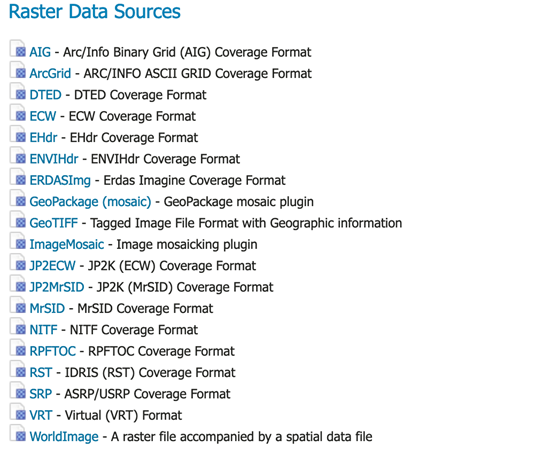
Also, here is the screen shot of the data sources - so yes, i believe I see the jp2000 store:
Really at a loss for what is going on here. It all seems correct.
Thanks again!
Jason
On Fri, Mar 22, 2019 at 10:49 AM Daniele Romagnoli <daniele.romagnoli@…1107…> wrote:
Hi Jason,
did you try the javainfo executable available on the native libs package to test how the java part is working?
The blue note section in this chapter:
https://docs.geoserver.org/2.14.x/en/user/data/raster/gdal.html#installing-gdal-native-libraries
Are you able to see the GDAL JP2K coverage store in the raster data sources list in the GeoServer GUI?
https://docs.geoserver.org/2.14.x/en/user/_images/newsource.png
Please, let us know.
Best Regards,
Daniele
On Fri, Mar 22, 2019 at 3:04 PM Jason Cradit <jasoncradit@…84…> wrote:
Hey all, i’m at my wits end with GDAL. It looks as if everything is working as I see it in server settings > modules as enabled:
ImageI/O-Ext GDAL Coverage Extension
gs-gdal
GridCoverage2DReader
1.1.28But I end up with errors trying to add a jp2000 store:
Could not list layers for this store, an error occurred retrieving them: The Provided input is not supported by this reader
Running gdalinfo on the jp2 file yields:
Driver: JP2ECW/ERDAS JPEG2000 (SDK 3.x)
Files:
Size is 60000, 40000
Coordinate System is:
PROJCS[“WGS_1984_Web_Mercator_Auxiliary_Sphere”,
GEOGCS[“GCS_WGS_1984”,
DATUM[“WGS_1984”,
SPHEROID[“WGS_84”,6378137,0]],
PRIMEM[“Greenwich”,0],
UNIT[“Degree”,0.017453292519943295]],
PROJECTION[“Mercator_1SP”],
PARAMETER[“central_meridian”,0],
PARAMETER[“latitude_of_origin”,0],
PARAMETER[“false_easting”,0],
PARAMETER[“false_northing”,0],
PARAMETER[“Auxiliary_Sphere_Type”,0],
UNIT[“Meter”,1]]
Origin = (-10926000.000000000000000,4266000.000000000000000)
Pixel Size = (0.150000000000000,-0.150000000000000)
Corner Coordinates:
Upper Left (-10926000.000, 4266000.000)
Lower Left (-10926000.000, 4260000.000)
Upper Right (-10917000.000, 4266000.000)
Lower Right (-10917000.000, 4260000.000)
Center (-10921500.000, 4263000.000)
Band 1 Block=60000x1 Type=Byte, ColorInterp=Red
Overviews: 30000x20000, 15000x10000, 7500x5000, 3750x2500, 1875x1250, 937x625, 468x312, 234x156
Band 2 Block=60000x1 Type=Byte, ColorInterp=Green
Overviews: 30000x20000, 15000x10000, 7500x5000, 3750x2500, 1875x1250, 937x625, 468x312, 234x156
Band 3 Block=60000x1 Type=Byte, ColorInterp=Blue
Overviews: 30000x20000, 15000x10000, 7500x5000, 3750x2500, 1875x1250, 937x625, 468x312, 234x156
So I believe the file is good and readable.
I’m attempting to install Geoserver 2.14.2 with GDAL 1.9.2 following the instructions from here: https://docs.geoserver.org/2.14.x/en/user/data/raster/gdal.html
I’m using Docker, and here is the installation:
FROM tomcat:9-jre8
MAINTAINER Oscar Fonts <oscar.fonts@…6748…>
ENV GEOSERVER_VERSION 2.14.2
ENV GEOSERVER_DATA_DIR /var/local/geoserver
ENV GEOSERVER_INSTALL_DIR /usr/local/geoserver
ENV GDAL_DATA=/usr/share/gdal/
ENV LD_LIBRARY_PATH=/usr/local/gdal
Uncomment to use APT cache (requires apt-cacher-ng on host)
#RUN echo “Acquire::http { Proxy "http://`/sbin/ip route|awk ‘/default/ { print $3 }’`:3142"; };” > /etc/apt/apt.conf.d/71-apt-cacher-ng
Microsoft fonts
RUN echo “deb http://httpredir.debian.org/debian stretch contrib” >> /etc/apt/sources.list
RUN set -x \
&& apt-get update \
&& apt-get install -yq ttf-mscorefonts-installer
&& rm -rf /var/lib/apt/lists/*
Native JAI & ImageIO
RUN cd /usr/lib/jvm/java-8-openjdk-amd64 \
&& wget http://download.java.net/media/jai/builds/release/1_1_3/jai-1_1_3-lib-linux-amd64-jdk.bin \
&& tail -n +139 jai-1_1_3-lib-linux-amd64-jdk.bin > INSTALL-jai \
&& chmod u+x INSTALL-jai \
&& ./INSTALL-jai \
&& rm jai-1_1_3-lib-linux-amd64-jdk.bin INSTALL-jai *.txt \
&& wget http://download.java.net/media/jai-imageio/builds/release/1.1
–
Regards,
Daniele Romagnoli
==
GeoServer Professional Services from the experts! Visit http://goo.gl/it488V for more information.
==
Ing. Daniele Romagnoli
Senior Software Engineer
GeoSolutions S.A.S.
Via di Montramito 3/A
55054 Massarosa (LU)
Italy
phone: +39 0584 962313
fax: +39 0584 1660272
http://twitter.com/geosolutions_it
Con riferimento alla normativa sul trattamento dei dati personali (Reg. UE 2016/679 - Regolamento generale sulla protezione dei dati “GDPR”), si precisa che ogni circostanza inerente alla presente email (il suo contenuto, gli eventuali allegati, etc.) è un dato la cui conoscenza è riservata al/i solo/i destinatario/i indicati dallo scrivente. Se il messaggio Le è giunto per errore, è tenuta/o a cancellarlo, ogni altra operazione è illecita. Le sarei comunque grato se potesse darmene notizia.
This email is intended only for the person or entity to which it is addressed and may contain information that is privileged, confidential or otherwise protected from disclosure. We remind that - as provided by European Regulation 2016/679 “GDPR” - copying, dissemination or use of this e-mail or the information herein by anyone other than the intended recipient is prohibited. If you have received this email by mistake, please notify us immediately by telephone or e-mail.

