In our path to get custom editor and templates based on iso 19139 schema we have been testing the how it all works from scratch and have encountered some issues before making customizations.
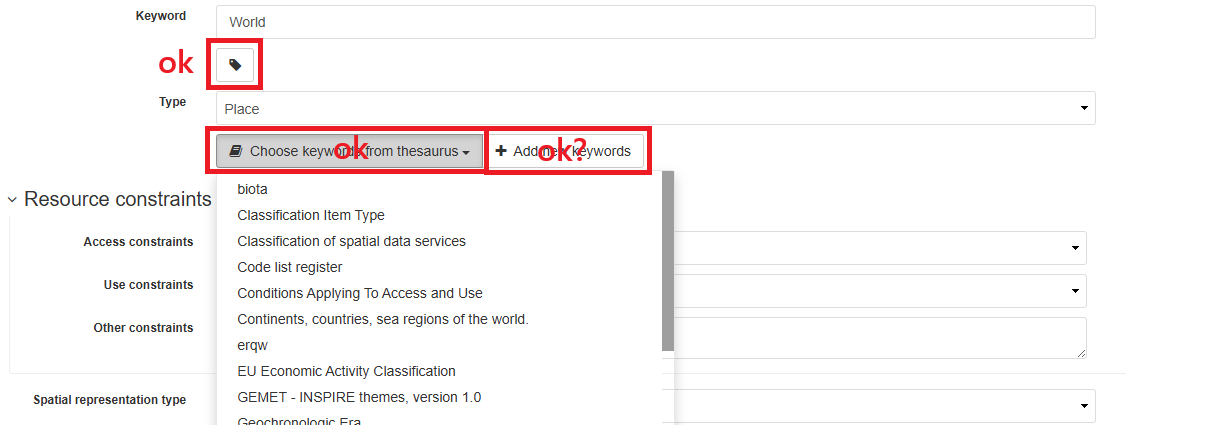
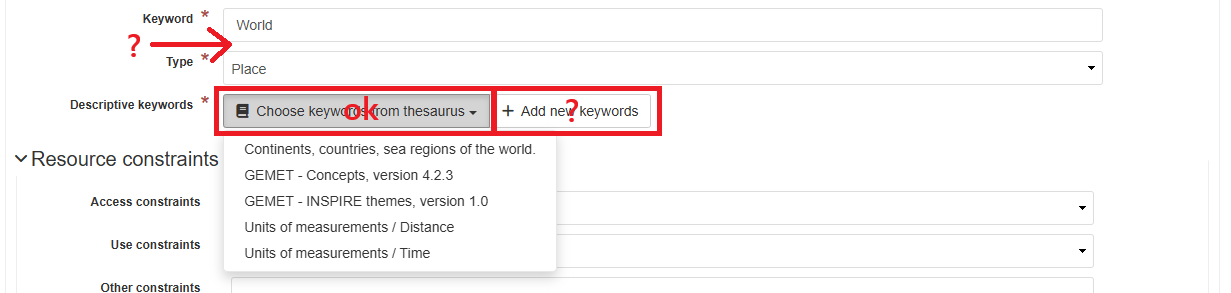
First off, in Simple view the ‘Add new keywords’ button won’t work if you don’t choose a thesaurus first. The rest of ‘+’ buttons will simply not work at all
Second, despite we have added Organization and Conctacts fragments though the Directory manager we see no button to search for contacts in the editor, both in Simple and Full views.
We have made no change to condif-editor.xml and we assume it should work from scratch just by adding a few gmd:CI_ResponsibleParty fragments.
Upon making some research we have tried changing data-insert-modes attribute for the data-gn-directory-entry-selector directive in gmd:contact, gmd:pointOfContact and gmd:distributorContact elements from data-insert-modes=“” to data-insert-modes=“text” to no avail.
Hello agp and welcome to the GeoNetwork community,
Creating a custom editor and templates is quite a challenging place to start with core-geonetwork development. You may wish to review developer workshop material (in the developer guide) to get comfortable with the technologies used.
Add new keywords does indeed need a place to draw keywords from, the maintainer guide has some information, but we very much welcome documentation updates. There is an edit button on each page.
I have not set it up myself, but contacts are also has a heading in the maintenance guide (managing directories) that could be improved with an example.
Demo: Thanks for the reminder, that demo should be shut off. If you check the Admin Console > Statistics and Status > Information page it shows:
JVM version: Java 8
Branch base of the build: 3.12.x
Thanks for your quick response.
We actually downloaded 4.4.9 release from here. Which I think is the same as this.
We feel stuck right now. We thought it would just need customization through the ui (templates, subtemplates, users and groups,ui settings…) and minor file changes.
INSPIRE themes thesaurus is available in 4.4.9 from scratch and choosing it from the 'Choose keywords form thesaurus’ dropdown menu does add a kewords section. We have also added GEMET Concepts thesaurus and it’s working. It is the ‘Add new keywords’ button that is not working in the Simple view. It does using the Full view.
That 3.12.x demo did not have this issue. To be fair, the ‘Add new keywords’ button only adds a new keyword for the first Keyword Type in the editor but there’s the button with the tag icon which does work. Checking the different files for 4.4.9 release it seemed to us this is how it should be from scratch too.
We followed the guide to understand how ‘subtemplates’ directories work and looked for similar issues to ours in this community. No idea why it is not working in 4.4.9. We see no button for any contact table (metadata, identification or distribution).
This is from the 3.12 demo:
- Cllicking the Add contact button adds an empty row to the table.
- The Search for a contact box shows the contact ‘fragments’ added to the directories.
This is from our 4.4.9 geonetwork:
- When hoovering over the area under the table there’s that div with class ‘form-group gn-field gn-required gn-extra-field gn-add-field’ where we guess the Add contact button and Search for a contact box should be. But they’re not!