Geoserver 2.27.2 - Cannot find JNDI data source: java:comp/env/jdbc/oracle

Hi,

I’m migrating from geoserver 2.25.2 to 2.27.2 and using the docker image also.
I follow the documentation, that says the context.xml now is inside the tomcat server.xml, but somehow the geoserver cannot find it.
I’m using the oracle plugin, with JNDI connection.

server.xml

 <Context antiResourceLocking="false" override="true" docBase="geoserver" privileged="false" crossContext="true" path="${WEBAPP_CONTEXT}">
    <!-- check parameters https://tomcat.apache.org/tomcat-9.0-doc/jdbc-pool.html -->
    <Resource name="jdbc/oracle"
            auth="Container"
            driverClassName="oracle.jdbc.OracleDriver"
            factory="org.apache.tomcat.dbcp.dbcp2.BasicDataSourceFactory"
           ......
    />
</Context>

docker compose environment variables:

    environment:
      - WEBAPP_CONTEXT=/geoserver
      - SKIP_DEMO_DATA=true
      - INSTALL_EXTENSIONS=true
      - STABLE_EXTENSIONS=control-flow,css,oracle,printing,querylayer

error:
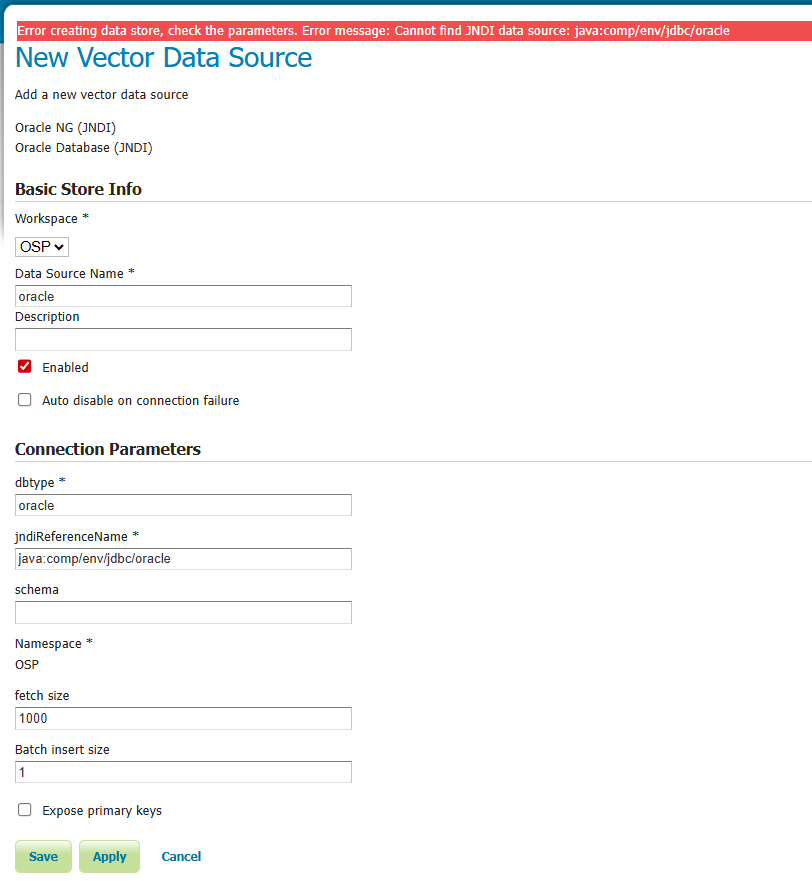
Any thoughts on this?

Thank you,
Tiago

I am not sure how that works, for the oracle connection to be defined by tomcat, tomcat needs to have the JDBC driver.

Do the tomcat logs say anything on startup trying to create jdbc/oracle ?

Digging a bit more,

Geoserver plugin for oracle datasources also brings the ojdbc driver.

geoserver-2.27.2-oracle-plugin.zip

root@cb8bb6706918:/usr/local/tomcat# ll webapps/geoserver/WEB-INF/lib/ | egrep 'oracle|ojdbc'
-rw-r--r-- 1 root root    96233 Jul 17 14:35 gt-jdbc-oracle-33.2.jar
-rw-r--r-- 1 root root  7310561 Feb  4  2025 ojdbc11-23.7.0.25.01.jar

My problem was that i configured under “geo-configs”, a server.xml and a server-https.xml.
I’m not sure, but probably i need to choose the one that i want and deploy it.

    volumes:
      - ${DOCKER_CONFIGS}/geo-data:/opt/geoserver_data
      - ${DOCKER_CONFIGS}/geo-libs:/opt/additional_libs
      - ${DOCKER_CONFIGS}/geo-configs:/opt/config_overrides <<<<--------
      - ${DOCKER_CONFIGS}/geo-fonts:/opt/additional_fonts/

Now it works with only one “server.xml” file. :blush:

Thank you