Hello,
Using the web interface I am trying to access “Authentication” (under “Security” heading).
When I clear here, I get the “Oops, something went wrong…” message.
I’ve attached my log file.
Note that I can access the other pages under “Security” just not authentication.
geoserver2018326423.log (5.38 MB)
···
Kris Johnson
Natural Resources Research Institute
5013 Miller Trunk Highway, Duluth, MN 55811
p: 218.788.2767
www.nrri.umn.edu
Hi Kris,
One ca see a 'Bad credentials' exception in your logs, but it is difficult
to say whether that is exactly the cause, or something else, give the noise
in the file you attached.
I would recommend to clear the log, set it for 'PRODUCTION_LOGGING' (see
here how:
http://docs.geoserver.org/latest/en/user/configuration/globalsettings.html#config-globalsettings),
repeat the steps, then come back with another copy of the log.
Best regards,
Manuel
--
Sent from: http://osgeo-org.1560.x6.nabble.com/GeoServer-User-f3786390.html
Hi Manuel,
Thank you for the response.
I did as recommended and it trimmed down the log file quite a bit.
Here’s what it reports now:
2018-03-29 21:01:30,004 DEBUG [geoserver.logging] - CONFIGURING GEOSERVER LOGGING -------------------------
2018-03-29 21:01:30,004 DEBUG [geoserver.logging] - GeoServer logging profile ‘PRODUCTION_LOGGING.properties’ enabled.
2018-03-29 21:01:30,123 WARN [geoserver.security] - Failed login, user admin from 131.212.22.166
2018-03-29 21:03:47,328 WARN [geoserver.security] - Failed login, user admin from 131.212.22.166
2018-03-29 21:03:57,398 WARN [geoserver.security] - Failed login, user admin from 131.212.22.166
2018-03-29 21:04:15,948 WARN [geoserver.security] - Failed login, user admin from 131.212.22.166
I should also say that clicking the logout button also produces an error:
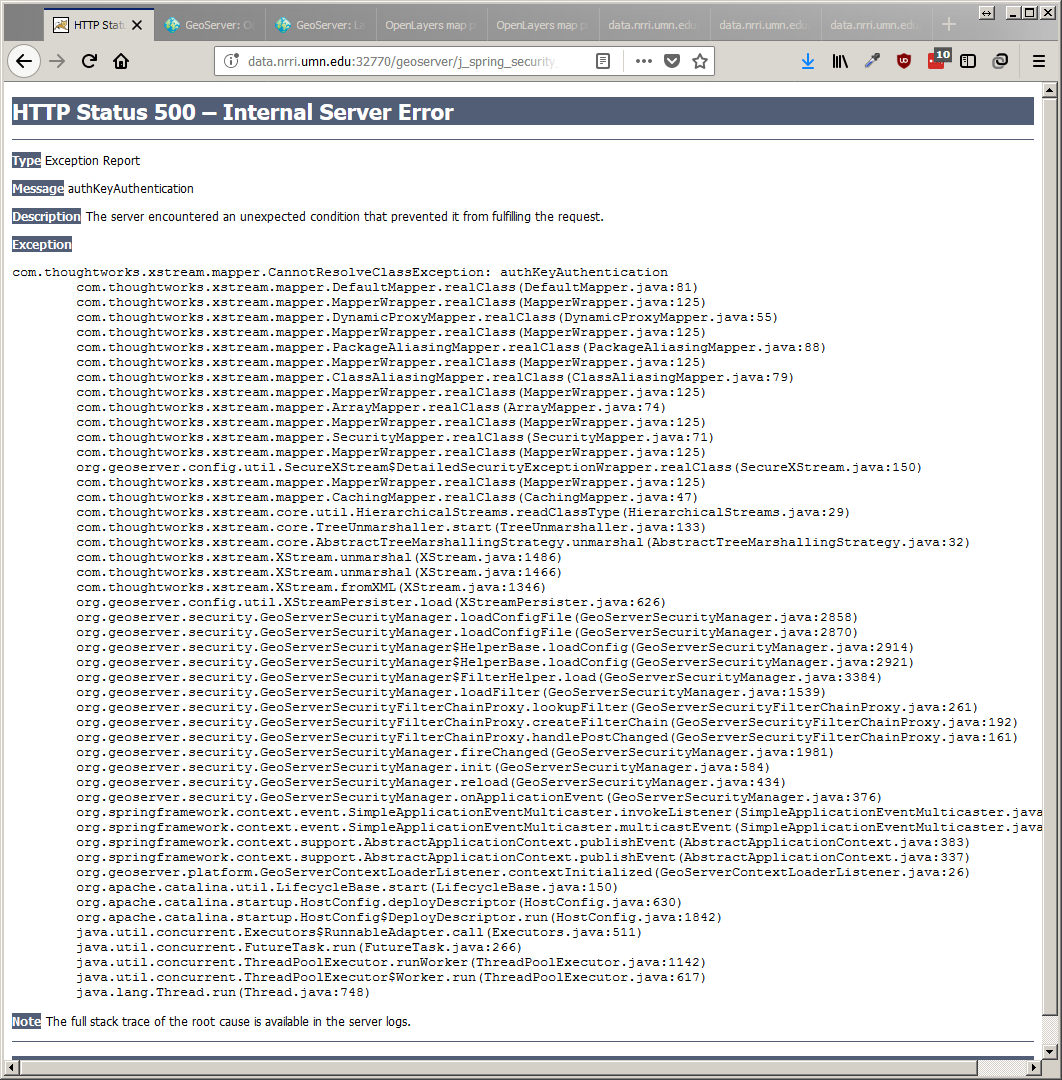
I added that here in case the two were related.
Any thoughts on the “failed login” warning? Like I mentioned it appears that the “Authentication” page is the only page I am unable to access.
Thanks again.
···
On Thu, Mar 29, 2018 at 7:49 AM, timita <timita@anonymised.com> wrote:
Hi Kris,
One ca see a ‘Bad credentials’ exception in your logs, but it is difficult
to say whether that is exactly the cause, or something else, give the noise
in the file you attached.
I would recommend to clear the log, set it for ‘PRODUCTION_LOGGING’ (see
here how:
http://docs.geoserver.org/latest/en/user/configuration/globalsettings.html#config-globalsettings),
repeat the steps, then come back with another copy of the log.
Best regards,
Manuel
–
Sent from: http://osgeo-org.1560.x6.nabble.com/GeoServer-User-f3786390.html
Check out the vibrant tech community on one of the world’s most
engaging tech sites, Slashdot.org! http://sdm.link/slashdot
Geoserver-users mailing list
Please make sure you read the following two resources before posting to this list:
If you want to request a feature or an improvement, also see this: https://github.com/geoserver/geoserver/wiki/Successfully-requesting-and-integrating-new-features-and-improvements-in-GeoServer
Geoserver-users@anonymised.com.382…sourceforge.net
https://lists.sourceforge.net/lists/listinfo/geoserver-users
–
Kris Johnson
Natural Resources Research Institute
5013 Miller Trunk Highway, Duluth, MN 55811
p: 218.788.2767
www.nrri.umn.edu
Hi Kris,
The way I work with GeoServer is to write comprehensive Node.js wrapper apps
around it, with their own authentication mechanisms and the rest, and only
control it via REST. So I'm not familiar too much with GS's auth system. I'm
trying here my best, mostly guiding you with respect to debugging and hoping
that you will uncover the issue by yourself.
I can't know exactly what is causing the warning, but in the screenshot I
can see an exception called 'authKeyAuthentication'. I know that GeoServer
has a community module called 'Key authentication'
http://docs.geoserver.org/latest/en/user/community/authkey/index.html
Are you using the above module? Can you think of any plugins which you
installed and which might be affecting the authentication process (e.g.
GeoFence)?
Also, try and remember any configuration steps that you have performed
before this started to happen.
Best,
Manuel
--
Sent from: http://osgeo-org.1560.x6.nabble.com/GeoServer-User-f3786390.html
Hi Manuel,
I think you might be on to something with the authKey exception. I did experiment with using authKey, but forgot about it and maybe changed a setting that is throwing off the whole site. I’ll look into that.
···
On Sat, Mar 31, 2018 at 10:42 AM, timita <timita@anonymised.com> wrote:
Hi Kris,
The way I work with GeoServer is to write comprehensive Node.js wrapper apps
around it, with their own authentication mechanisms and the rest, and only
control it via REST. So I’m not familiar too much with GS’s auth system. I’m
trying here my best, mostly guiding you with respect to debugging and hoping
that you will uncover the issue by yourself.
I can’t know exactly what is causing the warning, but in the screenshot I
can see an exception called ‘authKeyAuthentication’. I know that GeoServer
has a community module called ‘Key authentication’
http://docs.geoserver.org/latest/en/user/community/authkey/index.html
Are you using the above module? Can you think of any plugins which you
installed and which might be affecting the authentication process (e.g.
GeoFence)?
Also, try and remember any configuration steps that you have performed
before this started to happen.
Best,
Manuel
–
Sent from: http://osgeo-org.1560.x6.nabble.com/GeoServer-User-f3786390.html
Check out the vibrant tech community on one of the world’s most
engaging tech sites, Slashdot.org! http://sdm.link/slashdot
Geoserver-users mailing list
Please make sure you read the following two resources before posting to this list:
If you want to request a feature or an improvement, also see this: https://github.com/geoserver/geoserver/wiki/Successfully-requesting-and-integrating-new-features-and-improvements-in-GeoServer
Geoserver-users@anonymised.com.382…sourceforge.net
https://lists.sourceforge.net/lists/listinfo/geoserver-users
–
Kris Johnson
Natural Resources Research Institute
5013 Miller Trunk Highway, Duluth, MN 55811
p: 218.788.2767
www.nrri.umn.edu
Hi Manuel,
I tried rebuilding my geoserver (I run it as a docker container), which has fixed some issues in the past, but did not work this time.
I think the issue may be that I need to disable authKey authentication but to do so I need to access the Authentication page. But when I attempt to access that page it throws the error. So kind of a catch-22.
Do you know of any way I can side step accessing the Authentication page via the web interface and disable authKey through some other means?
Thanks
···
On Mon, Apr 9, 2018 at 12:22 PM, Kris Johnson <kristofj@anonymised.com> wrote:
Hi Manuel,
I think you might be on to something with the authKey exception. I did experiment with using authKey, but forgot about it and maybe changed a setting that is throwing off the whole site. I’ll look into that.
–
On Sat, Mar 31, 2018 at 10:42 AM, timita <timita@anonymised.com> wrote:
Hi Kris,
The way I work with GeoServer is to write comprehensive Node.js wrapper apps
around it, with their own authentication mechanisms and the rest, and only
control it via REST. So I’m not familiar too much with GS’s auth system. I’m
trying here my best, mostly guiding you with respect to debugging and hoping
that you will uncover the issue by yourself.
I can’t know exactly what is causing the warning, but in the screenshot I
can see an exception called ‘authKeyAuthentication’. I know that GeoServer
has a community module called ‘Key authentication’
http://docs.geoserver.org/latest/en/user/community/authkey/index.html
Are you using the above module? Can you think of any plugins which you
installed and which might be affecting the authentication process (e.g.
GeoFence)?
Also, try and remember any configuration steps that you have performed
before this started to happen.
Best,
Manuel
–
Sent from: http://osgeo-org.1560.x6.nabble.com/GeoServer-User-f3786390.html
Check out the vibrant tech community on one of the world’s most
engaging tech sites, Slashdot.org! http://sdm.link/slashdot
Geoserver-users mailing list
Please make sure you read the following two resources before posting to this list:
If you want to request a feature or an improvement, also see this: https://github.com/geoserver/geoserver/wiki/Successfully-requesting-and-integrating-new-features-and-improvements-in-GeoServer
Geoserver-users@anonymised.comrge.net
https://lists.sourceforge.net/lists/listinfo/geoserver-users
–
Kris Johnson
Natural Resources Research Institute
5013 Miller Trunk Highway, Duluth, MN 55811
p: 218.788.2767
www.nrri.umn.edu
Kris Johnson
Natural Resources Research Institute
5013 Miller Trunk Highway, Duluth, MN 55811
p: 218.788.2767
www.nrri.umn.edu
Hi Kris,
As mentioned above, I'm by no means familiar with the authentication options
for GeoServer, so I'll do my best to help with debugging it yourself.
You say you use a Docker container. Did you look at the installation script?
Try and remove any line that pulls in and installs the authKey module. If
all else fails, try to SSH into the box and 'rm -f' the jar from GeoServer's
WEB-INF/lib directory. Then restart the GeoServer instance.
If you have multiple GS instances (i.e. multiple Tomcat containers), make
sure you do the same for all.
According to the last paragraph on this page, the file seems to be called
'authkey.jar':
http://docs.geoserver.org/latest/en/user/community/authkey/index.html#provider-pluggability
<http://docs.geoserver.org/latest/en/user/community/authkey/index.html#provider-pluggability>
*Exercise common sense!* Make sure you back up the GS data directory before
doing any of the above.
Good luck!
--
Sent from: http://osgeo-org.1560.x6.nabble.com/GeoServer-User-f3786390.html