Hello everyone,
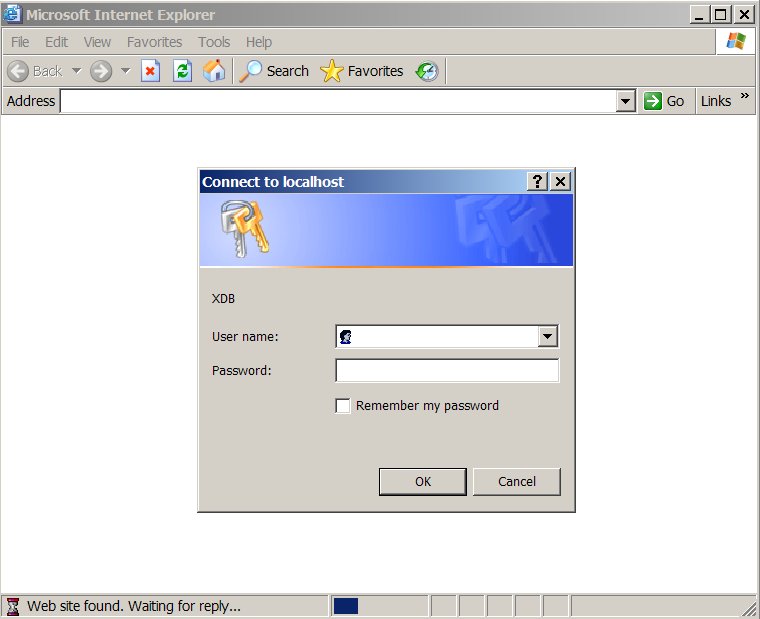
I have been using GeoServer 1.7.6 on WinXP SP2 for a while without major trouble. Since yesterday when I try to log to the admin page (http://localhost:8080/geoserver) I’m being presented with an authentication screen for something called XDB (please take a look to the image attached). What is this? What credentials should I use to log on to the admin page?
Thanks,
Luís
Luís de Sousa ha scritto:
Hello everyone,
I have been using GeoServer 1.7.6 on WinXP SP2 for a while without major trouble. Since yesterday when I try to log to the admin page (http://localhost:8080/geoserver) I'm being presented with an authentication screen for something called XDB (please take a look to the image attached). What is this? What credentials should I use to log on to the admin page?
Never seen this, but a quick Google search says Oracle is running
an XDB software on port 8080:
http://www.togaware.com/linux/survivor/XDB.html
Did you install Oracle yesterday?
Cheers
Andrea
--
Andrea Aime
OpenGeo - http://opengeo.org
Expert service straight from the developers.
Hi Andrea,
I did install Oracle 9.2 yesterday… but I have installed Oracle with GeoServer in the past on other XP installations without problems. Any suggestions on how to solve this?
Thanks,
Luís
2009/12/1 Andrea Aime <aaime@anonymised.com>
Luís de Sousa ha scritto:
Hello everyone,
I have been using GeoServer 1.7.6 on WinXP SP2 for a while without major trouble. Since yesterday when I try to log to the admin page (http://localhost:8080/geoserver) I’m being presented with an authentication screen for something called XDB (please take a look to the image attached). What is this? What credentials should I use to log on to the admin page?
Never seen this, but a quick Google search says Oracle is running
an XDB software on port 8080:
http://www.togaware.com/linux/survivor/XDB.html
Did you install Oracle yesterday?
Cheers
Andrea
–
Andrea Aime
OpenGeo - http://opengeo.org
Expert service straight from the developers.
Luís de Sousa ha scritto:
Hi Andrea,
I did install Oracle 9.2 yesterday... but I have installed Oracle with GeoServer in the past on other XP installations without problems. Any suggestions on how to solve this?
Either tell Oracle to run its service on a port other than 8080
(I do that routinely when I install Oracle XE, for example) or tell
GS to do that. For GeoServer it's actually a problem of telling the
container that runs it.
If you are using the Windows installer then container used is Jetty
and you'll have to manually edit a configuration file located at
<geoserver_install_dir>/etc/jetty.xml.
Look for the line:
<Set name="port"><SystemProperty name="jetty.port" default="8080"/></Set>
and change it to:
<Set name="port"><SystemProperty name="jetty.port" default="8081"/></Set>
to run on port 8081
Cheers
Andrea
--
Andrea Aime
OpenGeo - http://opengeo.org
Expert service straight from the developers.
Alternatively, you can change the XDB port
http://www.filibeto.org/sun/lib/nonsun/oracle/10.2.0.1.0/B19306_01/install.102/b15660/app_port.htm#CIHCJJIG
To change the Oracle XDB ports:
-
Check that the Oracle listener is running. To do so, in the Services control panel, make sure that the Oracle TNS Listener service (for example, OracleOraDb10g_home1TNSListener) is set to Started.
If you cannot start the listener, refer to Oracle Database Net Services Administrator’s Guide.
-
Log into SQLPlus or iSQLPlus as SYS or XDB using the SYSDBA role.
For example, to log in to SQL*Plus as SYS using the password welcome:
$ sqlplus "sys/welcome AS SYSDBA"
-
Run the catxdbdbca.sql script.
For example, to use 2200 for the FTP port and 8200 for the HTTP port, and assuming your Oracle home is in the following location, enter the following command:
SQL> @$ORACLE_HOME/rdbms/admin/catxdbdbca.sql 2200 8200
-
Exit SQLPlus or iSQLPlus.
sophia
2009/12/1 Andrea Aime <aaime@anonymised.com.>
Luís de Sousa ha scritto:
Hi Andrea,
I did install Oracle 9.2 yesterday… but I have installed Oracle with
GeoServer in the past on other XP installations without problems. Any
suggestions on how to solve this?
Either tell Oracle to run its service on a port other than 8080
(I do that routinely when I install Oracle XE, for example) or tell
GS to do that. For GeoServer it’s actually a problem of telling the
container that runs it.
If you are using the Windows installer then container used is Jetty
and you’ll have to manually edit a configuration file located at
<geoserver_install_dir>/etc/jetty.xml.
Look for the line:
and change it to:
to run on port 8081
Cheers
Andrea
–
Andrea Aime
OpenGeo - http://opengeo.org
Expert service straight from the developers.
Join us December 9, 2009 for the Red Hat Virtual Experience,
a free event focused on virtualization and cloud computing.
Attend in-depth sessions from your desk. Your couch. Anywhere.
http://p.sf.net/sfu/redhat-sfdev2dev
Geoserver-users mailing list
Geoserver-users@anonymised.comsts.sourceforge.net
https://lists.sourceforge.net/lists/listinfo/geoserver-users
Hi,
I managed to change the ports where XDB is listening using this guide:
http://www.idevelopment.info/data/Oracle/DBA_tips/xmldb/XMLDB_2.shtml
Thanks to all for your help. I now have a problem creating FeatureTypes but will open a new thread with that.
Luís
Hi,
If port 8080 is reserved, you need to change one or another software to use another port, I guess.
-Jukka Rahkonen-
-----Alkuperäinen viesti-----
Lähettäjä: Luís de Sousa [mailto:luis.a.de.sousa@anonymised.com]
Lähetetty: ti 1.12.2009 18:53
Vastaanottaja: Andrea Aime
Kopio: geoserver-users@lists.sourceforge.net
Aihe: Re: [Geoserver-users] XDB authentication ?
Hi Andrea,
I did install Oracle 9.2 yesterday... but I have installed Oracle with
GeoServer in the past on other XP installations without problems. Any
suggestions on how to solve this?
Thanks,
Luís
2009/12/1 Andrea Aime <aaime@anonymised.com>
Luís de Sousa ha scritto:
Hello everyone,
I have been using GeoServer 1.7.6 on WinXP SP2 for a while without major
trouble. Since yesterday when I try to log to the admin page (
http://localhost:8080/geoserver) I'm being presented with an
authentication screen for something called XDB (please take a look to the
image attached). What is this? What credentials should I use to log on to
the admin page?
Never seen this, but a quick Google search says Oracle is running
an XDB software on port 8080:
http://www.togaware.com/linux/survivor/XDB.html
Did you install Oracle yesterday?
Cheers
Andrea
--
Andrea Aime
OpenGeo - http://opengeo.org
Expert service straight from the developers.