Installing Lizmap with Docker

Hi

I am new to Lizmap and tried to install it with the Repo: GitHub - 3liz/lizmap-docker-compose: Run Lizmap stack with docker-compose · GitHub . Unfortunately I did not succeed. With the help of copilot I managed to get Lizmap running (on a Debian (Trixie) Server), but cannot run/open the demo projects. I connect via ssh to the server.

I get the following information in Lizmap-Administration:

Information

This installation does not allow QGIS with FCGI, either Py-QGIS-Server or QJazz must be used. This check about the QGIS wrapper can be disabled in your localconfig.ini.php following the original file lizmap/var/config/localconfig.ini.php.dist about the wrapper.

Version 3.9.7 - [800219e95]
Date of release 2026-03-25
URL in the QGIS desktop plugin http://localhost:8090/

Modules

No module installed

QGIS Server

**QGIS Server is not correctly installed in your server or the URL for OGC requests given in Lizmap configuration is not correct.

my settings:

QGIS Server

URL des QGIS Servers* http://127.0.0.1:7200/ows/
Basis URL der Lizmap Plugin API für den QGIS Server http://127.0.0.1:7200/lizmap/

any help appreciated!

Hi,

To make this work properly, you need to configure the Lizmap API URL in the admin page.

Here are the steps:

  1. Go to the admin page: http://localhost:8090/admin.php/admin/config
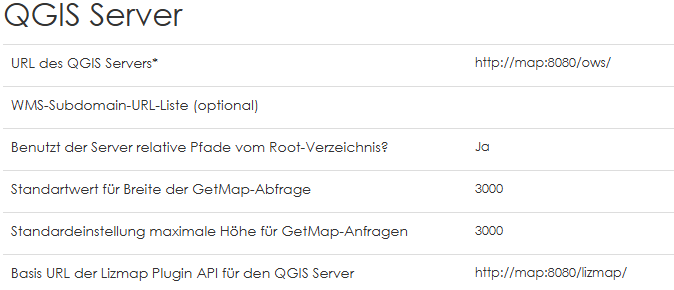
  2. Set the Lizmap API URL to: http://map:8080/lizmap/

Although this configuration should be automatic, it didn’t work in my case. I had to spend some time troubleshooting to identify the issue.

Regards

Thanks for the hint. Unfortunately it did not lead to success…

The logs show:
2026-04-07 11:32:47 172.31.0.1 lizmapadmin This installation does not allow QGIS with FCGI, either Py-QGIS-Server or QJazz must be used. This check about the QGIS wrapper can be disabled in your localconfig.ini.php following the original file lizmap/var/config/localconfig.ini.php.dist about the wrapper.

2026-04-07 11:32:47 172.31.0.1 lizmapadmin QGIS server minimum 3.34 and Lizmap QGIS server plugin minimum 2.13.0 need to be installed and configured correctly. Your QGIS server couldn’t be reached correctly with the given URL http://map:8080/ows/.

Are you sure to have changed both URLs?

URL of QGIS Server: http://map:8080/ows/

URL of Lizmap API: http://map:8080/lizmap/

(No idea about docker setups, but if i understand @Arnaud974 right and the API URL needs to be changed, then probably the URL to the QGIS server needs to be changed as well!)

hmm that is looking good - is your docker service “map” up and running? what gives

docker ps -a

CONTAINER ID IMAGE COMMAND CREATED STATUS PORTS NAMES

916a85d5b622 nginx:alpine “/docker-entrypoint.…” 34 minutes ago Up 34 minutes 80/tcp, 127.0.0.1:8090->8080/tcp lizmap-docker-compose-web-1

4f7e6930a429 3liz/lizmap-web-client:3.9 “/bin/lizmap-entrypo…” 34 minutes ago Up 34 minutes (healthy) lizmap-docker-compose-lizmap-1

57bd8efb9295 3liz/qgis-map-server:3.44 “/docker-entrypoint.…” 34 minutes ago Up 34 minutes 127.0.0.1:8091->8080/tcp lizmap-docker-compose-map-1

645fcfe1c7e0 postgis/postgis:15-3.4 “docker-entrypoint.s…” 34 minutes ago Up 34 minutes (healthy) 127.0.0.1:8093->5432/tcp lizmap-docker-compose-postgis-1

caa9a76cd9a1 redis:8-alpine “docker-entrypoint.s…” 34 minutes ago Up 34 minutes 6379/tcp lizmap-docker-compose-redis-1

338d186395ab 3liz/qgis-map-server:3.44 “/docker-entrypoint.…” 2 days ago Exited (0) 25 hours ago qgis-server

c3f49b0082d6 3liz/lizmap-web-client:3.9 “/bin/lizmap-entrypo…” 2 days ago Exited (1) 25 hours ago lizmap

I guess qgis server is not the issue because it produces the OWS like WMS – I could load those (from the sample projects) in my qgis desktop app.
something does not work between lizmap an qgis-server – my guess….

1 Like

Can you run

docker exec lizmap-docker-compose-lizmap-1 curl -s "http://map:8080/ows/?SERVICE=WMS&REQUEST=GetCapabilities" | head
  -20

and follow up question: have you run ./configure.sh configure before launching your docker docker compose up -d ? If not, do that:

./configure.sh configure
then:
docker compose down && docker compose up -d

root@srv-giant-web01:~# curl -s http://map:8080/ows/?SERVICE=WMS&REQUEST=GetCapabilities | head -20

root@srv-giant-web01:~#

indeed I did run the configure.sh script. However I ran it again – and now I get after

./configure.sh configure
then:
docker compose down && docker compose up -d

root@srv-giant-web01:/opt/lizmap2/lizmap-docker-compose# docker compose up -d

[+] up 6/6

:check_mark: Network lizmap-docker-compose_default Created 0.1s

:check_mark: Container lizmap-docker-compose-postgis-1 Healthy 2.8s

:check_mark: Container lizmap-docker-compose-redis-1 Started 0.3s

:check_mark: Container lizmap-docker-compose-map-1 Started 0.3s

✘ Container lizmap-docker-compose-lizmap-1 Error dependency lizmap failed to start 3.5s

:check_mark: Container lizmap-docker-compose-web-1 Created 0.0s

dependency failed to start: container lizmap-docker-compose-lizmap-1 is unhealthy

root@srv-giant-web01:/opt/lizmap2/lizmap-docker-compose# docker ps -a

CONTAINER ID IMAGE COMMAND CREATED STATUS PORTS NAMES

283f2ce0209c nginx:alpine “/docker-entrypoint.…” About a minute ago Created lizmap-docker-compose-web-1

90b71fa9baa1 3liz/lizmap-web-client:3.9 “/bin/lizmap-entrypo…” About a minute ago Restarting (4) 8 seconds ago lizmap-docker-compose-lizmap-1

eeb165b7bb0a 3liz/qgis-map-server:ltr-rc “/docker-entrypoint.…” About a minute ago Restarting (1) 10 seconds ago lizmap-docker-compose-map-1

de42f1af5afe postgis/postgis:15-3.4 “docker-entrypoint.s…” About a minute ago Up About a minute (healthy) 127.0.0.1:8093->5432/tcp lizmap-docker-compose-postgis-1

5326195e604b redis:8-alpine “docker-entrypoint.s…” About a minute ago Up About a minute 6379/tcp lizmap-docker-compose-redis-1

338d186395ab 3liz/qgis-map-server:3.44 “/docker-entrypoint.…” 2 days ago Exited (0) 26 hours ago qgis-server

c3f49b0082d6 3liz/lizmap-web-client:3.9 “/bin/lizmap-entrypo…” 2 days ago Exited (1) 26 hours ago lizmap

root@srv-giant-web01:/opt/lizmap2/lizmap-docker-compose#

I did the docker installation on Windows – and it ran very smoothly without any problems – so I have now Lizmap with the two sample projects up and running…

1 Like

Great good news :slight_smile: