Looking for feedback on idea: Improvements to style editor legend preview

Hi all,

I’d like to get your thoughts on a potential improvement to the GeoServer Style Editor—specifically the Legend Preview functionality.

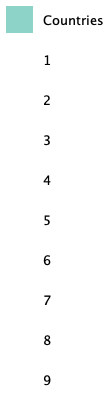
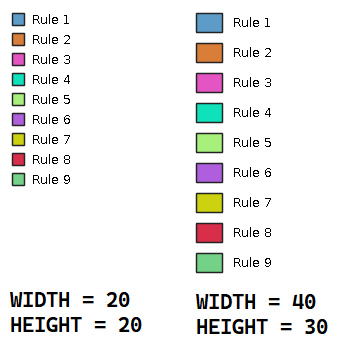
At the moment, the legend preview renders fixed 20x20 symbols. While this works for simple styles, it becomes limiting when working with more complex styles that include multiple symbolizers, custom fonts, or are intended for use in applications that request legends with specific parameters.

In my day-to-day work, I often design styles that are consumed by clients using the GetLegendGraphic request with custom parameters (e.g. size, font, layout). In those cases, the current preview doesn’t reflect how the legend will actually appear in the application.

My idea is to extend the Legend Preview UI with additional controls, such as:

  • Adjustable width and height

  • Font settings

  • Potentially other GetLegendGraphic parameters

This would allow users to preview the legend more accurately as it would be rendered in their application, directly from within the GeoServer UI.

I believe this could significantly improve the workflow when designing and testing more advanced styles.

Looking at the source (StyleAdminPanel in the WMS web module), it seems relatively straightforward to expose additional parameters in the UI. Since the preview ultimately relies on the existing GetLegendGraphic request, the backend support is already there—we would mainly need to extend the UI to allow users to specify parameters like WIDTH, HEIGHT, and font-related options.

I’m interested in hearing:

  • Whether this is something others have run into

  • If there are existing approaches or workarounds I may have missed

  • Any thoughts on how this could best be implemented (UI or backend considerations)

If this seems like a useful direction, I’d be happy to explore contributing to it.

Thanks in advance for any feedback!
1 Like

Hi @dionfleury and welcome.

I love all your ideas for making this section of the style editor more generally useful. If it gets too complicated you may wish to make another tab (like is done for map preview).

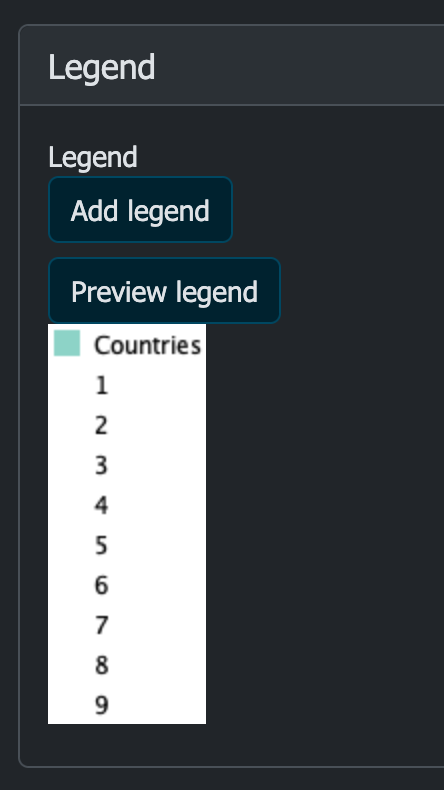
I am a bit confused by the 20x20 symbols comment - perhaps a GeoServer 3 regression the style editor shows 20 x 20 pixels but I do not think so? Maybe it is a 3.0-RC regression, let me check…

Nope it is showing the default ne:countries_mapcolor9 as intended:

http://localhost:8080/geoserver/wms?REQUEST=GetLegendGraphic&VERSION=1.0.0&FORMAT=image/png&WIDTH=20&HEIGHT=20&LAYER=ne:countries

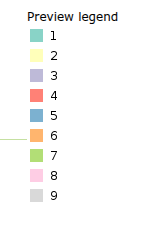
No idea why countries_mapcolor9 is not showing each color correctly, it is using Recode which is supposed to be supported for legend graphic generation.

Aside: If by 20x20 you mean the little symbols next to each label , presently you can can cheat by increasing the DPI and lowering the font size:

http://localhost:8080/geoserver/wms?REQUEST=GetLegendGraphic&VERSION=1.0.0&FORMAT=image/png&WIDTH=20&HEIGHT=20&LAYER=ne:countries&LEGEND_OPTIONS=dpi:182;fontSize:6

Hi @jive, thanks for your reply.

Yes that is exactly what I meant. By default, WIDTH=20&HEIGTH=20 renders as you put it “little” symbols next to each label. When designing and using more complex styles, you’d really want to take advantage of the fact that you can influence the symbol size in the WMS GetLegendGraphic request. While you still need some way of previewing your layer to see if your style renders the way you intended, the options I’m suggesting will allow you to validate if your legend is actually representative of your style.

I am aware that most software doesn’t actually implement a way to leverage the WMS GetLegendGraphic request parameters, so you usually end up with the default 20x20 symbol size and the default font.

Implementing controls for these parameters for the legend preview would also open the door for an option to save a legend you’re happy with as an online resource to override the default generated legend (which would default to 20x20 symbols).

You can already do that by modifying the URL, saving the image result and uploading it back to GeoServer. But that isn’t exactly a user-friendly way of doing something like this.

I’ll try exploring this further, and I’ll likely update this topic with results for further feedback and discussion.

Turns out the machinery does not like the “mapOnly”, “legendOnly” annotations, you can get rid of them now, use a simpler style, and have a good looking legend too:

Cheers
Andrea

I got my first proof of concept to work! We can now set a different symbol width and height for the legend preview option. I’ve also played around with the idea of separating the options for using an image as a default legend and the options for the preview.


The way I’ve done it is to simply add two additional input fields to the StyleAdminPanel class:

public class StyleAdminPanel extends StyleEditTabPanel {
  // ...
  private Integer legendSymbolWidth = 20;
  private Integer legendSymbolHeight = 20;
  protected NumberTextField<Integer> legendSymbolWidthTextField;
  protected NumberTextField<Integer> legendSymbolHeightTextField;
  // ...

And then add them during initUI:

add(legendSymbolWidthTextField = new NumberTextField<>(
  "legendSymbolWidth", 
  new PropertyModel<>(this, "legendSymbolWidth")));
add(legendSymbolHeightTextField = new NumberTextField<>(
  "legendSymbolHeight", 
  new PropertyModel<>(this, "legendSymbolHeight")));

Then, in the onClick for the preview button, process the input for these fields and set both values for the request.

// ...
legendSymbolWidthTextField.processInput();
legendSymbolHeightTextField.processInput();
// ...
GetLegendGraphicRequest request = new GetLegendGraphicRequest();
// ...
request.setWidth(legendSymbolWidth);
request.setHeight(legendSymbolHeight);

There are still two ways I can get it to break, and they probably need handling: Leaving either input empty will trigger a NullPointerException, which is currently caught with the message “Failed to build legend preview. Check to see if the style is valid”.

Setting a decimal value will correctly raise the complaint that the value is not a valid Integer.

I’ll probably look into implementing other legend options for the preview next. Curious to hear your thoughts on my progress so far.

You probably want to add at least a minimum value, eg. 10; I assume it will break for negative numbers as well, adding a maximum value and a stepsize of 1 would prevent decimal values: NumberTextField (Wicket Parent 10.10.0-SNAPSHOT API)