Dear Fellows,
I am stuck in the QGIS manual in this subject: How to make a dynamic map canvas. I can nor see the “item properties” as the manual indicates. Can you help me?
Best Regards
Jorge E. Rangel
Dear Fellows,
I am stuck in the QGIS manual in this subject: How to make a dynamic map canvas. I can nor see the “item properties” as the manual indicates. Can you help me?
Best Regards
Jorge E. Rangel
Hi Jorge,
I am guessing you are talking bout this chapter in the manual https://docs.qgis.org/3.16/en/docs/training_manual/map_composer/dynamic_layout.html ?
And I am assuming you are trying to create a print layout ? If so you are trying to add objects and configure the layout using the properties (aka item properties) correct ?
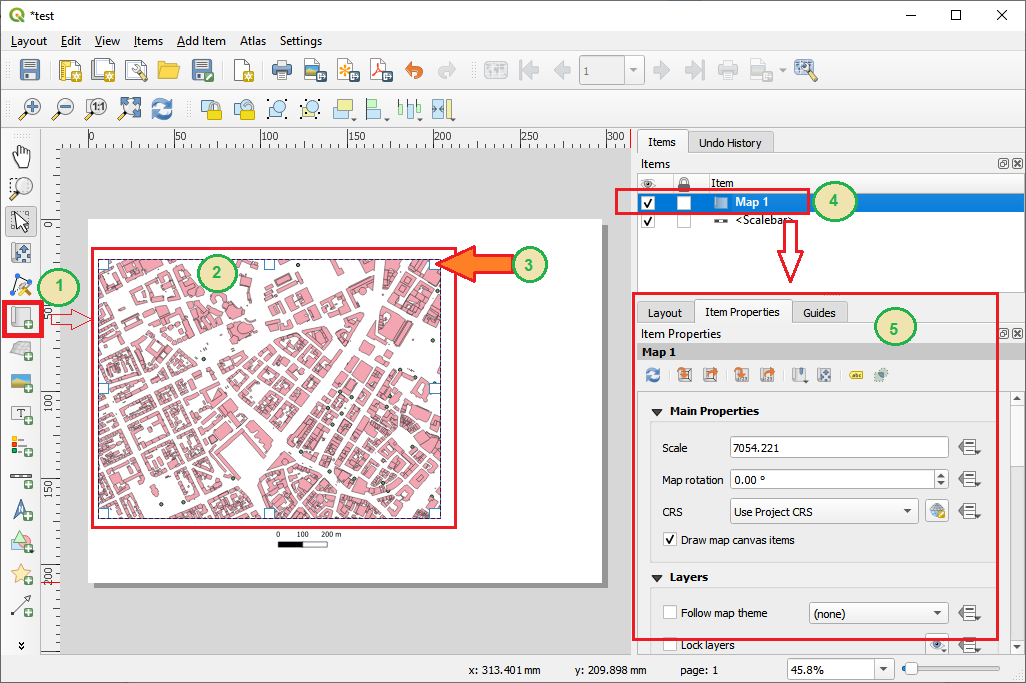
To see “item properties” you have to add and then select an object to the map layout. Now you should be able to see the item properties on the right hand side - see screen shoot or link here
http://www.terragis.net/docs/other/maplayout.png
The process is as follows by numbers in the graphic above:
From there you can configure all properties how the object is displayed etc.
Cheers
Karsten
From: Qgis-us-user [mailto:qgis-us-user-bounces@lists.osgeo.org] On Behalf Of Jorge Rangel Aldao
Sent: Wednesday, April 14, 2021 07:36
To: qgis-us-user@lists.osgeo.org
Subject: [Qgis-us-user] Learning QGIS
Dear Fellows,
I am stuck in the QGIS manual in this subject: How to make a dynamic map canvas. I can nor see the “item properties” as the manual indicates. Can you help me?
Best Regards
Jorge E. Rangel