Yes, this is an expected (though highly frustrating and poorly documented) breaking change introduced during the major core architecture upgrades between GeoServer 2.19.x and newer versions like 2.28.x.
Here is exactly what is happening under the hood and why your workaround behaves this way:
1. The Strict OGC Compliance Shift
In older versions (2.19.3), GeoServer used a loose custom parser for the namespace parameter in GetCapabilities requests. It simply filtered the workspace layers by the string prefix.
In modern versions, GeoServer strictly enforces the XML Namespace specifications. The namespace parameter is now strictly parsed as an explicit XML namespace declaration format. That’s why it throws the Illegal namespace declaration exception unless you pass it exactly like this: namespace=xmlns(mynamespace=http://your-workspace-uri).
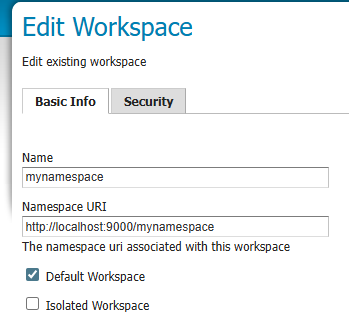
If you format it correctly but get zero layers, it means the URI inside the xmlns() bracket doesn’t perfectly match the Namespace URI configured in your GeoServer Workspace settings.
2. Why namespaces (plural) works as a workaround
The reason namespaces=mynamespace works is due to a backward-compatibility patch implemented in GeoServer’s dispatching layer (as you saw in the Jira ticket). When the multi-value namespaces filter is hit, GeoServer bypasses the strict xmlns validation rule and falls back to filtering the catalog by workspace names.
However, if you are migrating a production stack using the Kartoza Docker image, relying on the namespaces string parameter can cause unexpected caching issues if you are running behind an Ingress proxy (like Nginx or Traefik) or utilizing GeoWebCache (GWC), because GWC has strict parameter filters configured for namespace (singular) by default.
Modern Recommendation for Workspaces
If you want to isolate capabilities cleanly per client/workspace without breaking URL parameters, the production-grade standard now is to use Virtual OWS (Open Web Services) endpoints instead of global parameters.
Instead of hitting the global URL: /geoserver/wms?service=wms&...&namespace=mynamespace
You should isolate requests directly via the virtual workspace path: /geoserver/mynamespace/wms?service=wms&version=1.3.0&request=GetCapabilities
This completely eliminates parameter parsing exceptions, forces GeoServer to return only the layers belonging to mynamespace, and is perfectly cached by Docker reverse proxies.
Migrating legacy GIS stacks (especially jumping across 9+ minor versions like 2.19 to 2.28) inside containerized environments often surfaces these strict routing, Java engine, and database catalog mismatches.
If your team is looking to streamline this migration—whether it’s refactoring your automated Python ETL pipelines to match the new OGC specs, debugging memory leaks inside Kartoza Docker clusters, or setting up robust production deployments—feel free to drop me a line. I specialize in high-performance Python backends, GIS automation, and Docker infrastructure optimizations. I run a dedicated DevOps and script configuration service on Fiverr to help teams handle tricky version transitions seamlessly: Dockerize your python apps and setup automated pipelines by Kamedashe | Fiverr.